Product feedback software collects what customers tell you across in-app widgets, surveys, support tickets and sales calls, tags each item back to its source, and turns the recurring patterns into something a product team can prioritise. At enterprise scale it has one more job: keeping every conclusion traceable to the evidence that produced it, so a roadmap decision survives the review.
Most guides on this topic help you buy your first one. This one assumes you already have four.
You do not have a tool problem
The typical 500-person product org has a survey tool in CX, a widget one team installed two years ago, a voting board somewhere, and at least one spreadsheet nobody admits to maintaining. Across three to five products and a dozen teams, every group has solved feedback locally and nobody can see across them. If you want to see what the consolidated version looks like before reading the criteria, we have a breakdown of what enterprise product teams use Usersnap for.
That is the real situation, and it changes the question. What you are deciding is what has to be true before scattered evidence becomes something you can defend in a roadmap review.
The twelve criteria below are the ones that decide it. They are ordered roughly by how often they turn out to be the thing that breaks.
1. How long until the first useful item arrives
Ask how long from signing to the first piece of evidence a PM actually reads. Not how long the rollout takes, and not how long the training programme runs. The first useful item.
The answer should be measured in days, not quarters. If a vendor’s onboarding requires a taxonomy workshop before anything can be collected, you are buying a project, not a tool.
Separate two numbers while you are asking. What does a person submitting feedback need to know, and what does an admin need to configure? The first number should be zero. The second is where the real work sits, and it should be something one person can finish inside a week.
2. Does it show a path or an inventory
Open the dashboard a vendor demos and count how many things compete for attention. Then ask a simpler question: what happens to one piece of feedback, from arrival to decision?
A single path you can follow is what gets adopted across teams. A feature list gets adopted by the person who bought it and nobody else.
The path worth looking for is short. Something arrives. It gets tagged to its source and its topic automatically. Recurring items become a scored opportunity someone owns. There should be one screen where new items land, and one place where decisions live.
3. How far the integrations actually reach
Every vendor claims to integrate with everything. Ask for the list of native connectors, in writing, then check the four tools your evidence actually lives in today.
The ones that matter for a product org are usually the issue tracker, the support desk, the CRM and the place calls get recorded. If those four are native, everything else can run through Zapier, webhooks or a REST API and your evidence stays in one place. Miss one of the four and you are back to exporting CSVs within a month.
Ask specifically whether the sync runs both ways. Two-way status keeps both systems telling the same story, which is what keeps a team trusting the tool six months in.
4. What the category should include at this scale

A small team can get by with collection alone. An enterprise org cannot, because at that scale you are drowning, not starved.
At this scale the tool has to do four things. Collect from every channel your customers already use. Tag and group automatically, because nobody is reading 4,000 items by hand. Turn the groups into prioritised opportunities with the evidence still attached. Close the loop with the people who asked.
A tool that does the first and calls the rest “roadmapping” is a collection widget with a board bolted on. Check where each of the four actually happens, and whether the evidence survives the handoff between them.
5. How pricing scales with a 500-person org
Most feedback tools price per seat or per tracked user. Both punish exactly the behaviour you want, which is more people across more teams contributing evidence.
Model it properly before you shortlist. Take the number of people who will submit, the number who will read, and the number who will administer. Then ask each vendor how their pricing moves when the first number doubles. When contributors are free, evidence arrives from support, sales and CS as well as product, and you get the cross-team view you bought the platform for.
Ask what happens at renewal when usage has grown, and get it in writing.
6. Who has to learn it, and how much
There are three populations and they need very different things.
Customers submitting feedback should need no training at all. If a submission takes more than a few seconds or asks for information the person does not have, the volume collapses and the sample skews to the loudest.
Internal contributors, which usually means support and sales, need about five minutes. Their path should be one button inside the tool they already work in.
Only the administrator should need real onboarding. That is what lets the second and third product team adopt it on their own schedule instead of waiting for yours.
7. Where evidence lands and what it triggers
The failure mode is rarely collection. It is the well-organised archive that nobody opens.
Ask what happens automatically when an item arrives. Does it get tagged? Does it attach to an existing theme? Does anyone get told? A tool that requires a human to notice something before anything happens will work for one quarter, which is roughly how long the person who championed it stays enthusiastic.
The point of automation here is pace. Tagging, grouping and routing on arrival is what lets a team move on a signal the same week it appears instead of the quarter after. Then ask the reverse. When a decision is made, does the evidence behind it stay attached? Six months later, when someone asks why a feature was built, the answer should be one click and not an archaeology project.
8. Programmatic access: API, webhooks and AI tools
Check three things and check them before you look at tiers.
Is there a REST API, and can it read feedback data out as well as write in? Are there webhooks, so your own systems can react when something arrives? And can the AI tools your team already uses reach the evidence directly?
That last one is new and it is becoming the difference. If your PMs work in ChatGPT, Claude or Cursor, being able to query the evidence from inside those tools removes a whole category of copy-paste. Ask whether the connection reads historical data or only what arrives after you connect it, because the answer is usually the latter and it matters for the first few months.
9. The consolidation maths
This is the criterion most evaluations skip, and it is usually where the business case actually lives.
Count the tools this would replace. In most orgs the honest number is three to five: a survey tool, a widget, a voting board, sometimes a separate NPS product. Then count what each one costs you beyond licence fees, which means one security review each, one data processing agreement each, one renewal negotiation each, and one integration to maintain each.
A platform that covers the set is rarely cheaper on licence cost alone. It is usually much cheaper once the reviews and the agreements are counted, and that is the number procurement responds to.
10. What sits behind which tier
Get the tier table and mark the four things you actually need. Then find out which tier each one sits in.
The common traps are predictable. Single sign-on is almost always enterprise-only. Role-based permissions often sit a tier above where you expect. API access is sometimes gated. AI features are frequently a separate add-on.
None of these are unreasonable on their own. The problem is discovering them after the budget is approved. Ask for the gating in writing and price the tier you will actually be on, not the one in the comparison table.
11. Installation
Ask what has to be deployed and who has to deploy it.
The good answer is one snippet, added once, live in minutes, with no dependency on a release cycle. The bad answer involves an SDK per platform, a change to your build, and a slot in an engineering sprint that is already full.
This matters more than it sounds. Installation friction is the most common reason a feedback tool gets bought and never rolled out past the first team. If the second product team needs engineering time to adopt it, most of them will not.
12. Platform coverage, stated plainly
Make a vendor state which platforms they actually cover, in plain words.
Most feedback tools built for web applications are genuinely strong on web and weaker on native mobile. That is fine if your product is a web app. It is a serious problem if half your users are on iOS and nobody said so during the evaluation.
Make the vendor state the limitation out loud. A vendor who names their own gaps is usually telling the truth about the rest.
The criteria, in one table
| # | Criterion | The question to ask | What good looks like |
|---|
| 1 | Time to first value | How long until a PM reads the first item? | Evidence in a PM’s hands inside the first week |
| 2 | Path, not inventory | What happens to one item, end to end? | One path you can trace end to end |
| 3 | Integration reach | Are my four critical tools native, and does status sync both ways? | A written list, with your four critical tools on it |
| 4 | Scope | Collect, group, prioritise, close the loop. Where does each happen? | All four steps, with the evidence surviving each handoff |
| 5 | Pricing shape | What happens when contributors double? | Contributors are free, so evidence scales with the org |
| 6 | Learning curve | What do customers, contributors and admins each need? | Customers need nothing, contributors need five minutes |
| 7 | What it triggers | What happens automatically on arrival? | Tagged, grouped and routed before anyone opens it |
| 8 | Programmatic access | REST API, webhooks, and can our AI tools query it? | Open API, webhooks, and your AI tools can query it |
| 9 | Consolidation | How many tools, reviews and agreements does this replace? | Named: three to five tools, reviews and agreements |
| 10 | Tier gating | Which tier holds SSO, permissions, API and AI? | Written down before you price the deal |
| 11 | Installation | One snippet, or an engineering sprint? | One snippet, live the same day |
| 12 | Platform coverage | Which platforms, plainly? | A straight answer, limits included |
Which tools fit which shape
The market splits into recognisable shapes, and the shape matters more than the feature count.
If you want customers voting publicly on a roadmap, that is what Canny and Frill are built around. If your centre of gravity is the roadmap itself and feedback feeds into it, that is Productboard’s shape. If the work is coding and analysing long-form research interviews, that is Dovetail. If you need a single evidence layer across in-app, support and sales that stays traceable to source, that is the shape Usersnap’s product feedback tool is built in. We call that category a product evidence platform, to separate it from tools that collect and stop there.
None of these is better in the abstract. They answer different questions, and a tool bought for the wrong shape gets abandoned regardless of quality.
How Usersnap meets the twelve

Where it is strong. Signals from in-app widgets, surveys, NPS, CSAT, CES, support tickets and sales calls land in one place, each tagged back to where it came from. Every item arrives with browser, operating system, screen size and location attached, so a report is actionable without a follow-up question. Sentiment and topic are scored on arrival, and you can define the topics yourself rather than accept what the model picks. Recurring problems become opportunities on a shared board, scored by value and effort, with the linked evidence travelling with them. Announcements, emails and a changelog close the loop with the accounts that asked.
On integrations, Jira, Slack, Zendesk, Intercom, Salesforce and Zoom connect natively, and the rest go through Zapier, webhooks or the REST API. Jira Cloud status syncs both ways through the Forge app. The MCP connector lets ChatGPT, Claude and Cursor query a live workspace and create an opportunity without leaving the tool, reading data from the point you connect it.
Installation is one snippet, live in minutes. Data sits in AWS eu-central-1 or Ireland under GDPR, it is never used to train AI models, and AI features can be switched off per account. The trial is the first 20 feedback items, with no credit card and no time limit, and how pricing scales beyond that is published.
Where it is not the answer. Usersnap is not session replay and does not record passively. Recording starts when someone chooses to submit. It is not a heatmap tool. It is not a native mobile application, though a mobile form is in beta. It does not do feature flags or A/B testing. It is not sales conversation intelligence, and it is not an analytics platform. If what you need is a public voting board as the centrepiece, one of the tools above fits better.
Single sign-on is on the Enterprise plan. Role-based permissions start at Premium. The AI features, including the Channels ingestion that brings in calls and support conversations, sit in the AI sidekick add-on.
For teams sitting on hours of recorded calls, here’s a walkthrough on turning calls into product insights that actually reach the roadmap.
What customisation looks like in practice
Erste Group, one of the larger banking groups in Central Europe, runs Usersnap across a regulated product estate where the widget has to match each property and the data has to stay where compliance expects it. The customisation work was configuration rather than development, and that distinction is worth testing in your own evaluation by asking any vendor to open their configuration screen and show you.
Five ways teams collect it
The criteria above are about evaluating tools. These are the collection methods most enterprise product orgs end up running, usually in combination:
that explains it
- Omni-channel NPS surveys, run in-product and by email, with the score kept attached to the comment
- Website micro-surveys triggered at a specific step, so the answer carries the page it came from
- In-app questionnaires targeted at one segment
- Satisfaction review emails after a support interaction or a release
- Social and community listening, fed into the same queue as everything else
A tool should handle the set, because running five collection methods across five tools is how the fragmentation started in the first place. If you are writing the questions themselves, we keep a separate guide to product survey questions.

Frequently asked questions
What is product feedback software? Software that collects customer input across in-app widgets, surveys, support tickets and sales calls, tags each item to its source, and turns recurring patterns into prioritised work. At enterprise scale it also has to keep every conclusion traceable to the evidence behind it.
What is the difference between a product feedback tool and a product feedback system? A tool is the software. A system is the tool plus the process around it: who triages, how often, what threshold turns a theme into a roadmap item, and who closes the loop. Most failed rollouts bought a tool and never designed the system.
What is a software feedback survey? A short survey run inside a software product rather than by email, asking about a specific experience at the moment it happens. Response rates are higher than email because the context is fresh, and the answers carry the page or feature they came from.
What is a software satisfaction survey? A measurement of how satisfied users are with a product, usually CSAT, CES or NPS. The score on its own is close to useless. The value is in the open text next to it, which is what explains the number.
What is a feedback program? The operating model around collection: which channels run, who owns triage, how findings reach the roadmap, and how customers hear back. A program is what stops feedback becoming an archive.
How much does product feedback software cost? Most vendors price per seat or per tracked user, typically from tens to hundreds of dollars a month at small scale, rising steeply with contributors. The number worth calculating is not licence cost but what the platform replaces: three to five point tools, each with its own security review, data agreement and renewal.
Do we need one tool or several? At enterprise scale, several tools is usually how the problem started rather than how it gets solved. The test is whether evidence stays traceable when it moves between them. If it does not, consolidation is the fix.
Where to start
Most teams are told to choose between moving fast and being able to prove why. At enterprise scale you need both, and the twelve criteria above are what decide whether a tool gives you both or makes you pick. Take them, mark the four that would genuinely break your rollout, and ask every vendor those four before you look at a demo. Most evaluations run the other way round and end up comparing interfaces.
If a single traceable evidence layer across in-app, support and sales is what you are missing, that is what Usersnap’s product feedback tool is built for. The first 20 feedback items are free, with no credit card.
Turn scattered customer signals into decisions you can defend
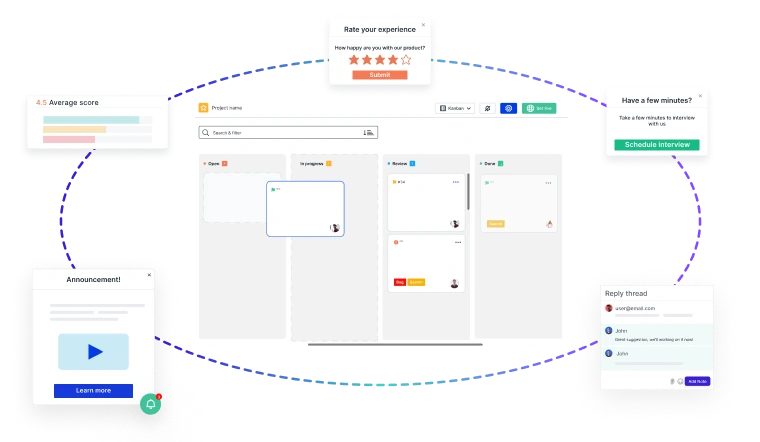
Support tickets, sales calls, in-app comments, surveys and NPS land in one shared view automatically, tagged back to the source the moment they arrive.
- See the pattern across channels, without anyone stitching tools together first.
- Start from a scored opportunity your team can act on the same day.
- Every claim traces back to a real comment, so the roadmap holds up to the follow-up question.
- One platform replaces three to five point tools, with a single data agreement and one security review.
One snippet connects Usersnap to your stack and it is live in minutes. Start free or book a demo with our team.
